Reverse DNS Lookup: Find the Hostname Behind an IP Address
Run a reverse DNS lookup, interpret PTR and empty results, check forward confirmation, and find the provider that can fix the record.

- domains
- guide
A reverse DNS lookup asks DNS for the hostname associated with an IP address. With ISC's dig utility, run dig -x 192.0.2.20 after replacing the documentation address with the address you need to inspect. ISC documents the reverse-query option. The result describes published DNS data, rather than proof of legal ownership or a list of every website on the address.
Start with the IP address recorded in the actual event. A mail log, server assignment, or connection log provides a better input than an assumed address. This guide explains the lookup and its limits. It does not perform a live lookup for your system.
Examples use reserved domain names and documentation IPv4 addresses.
The reverse query asks for a PTR record
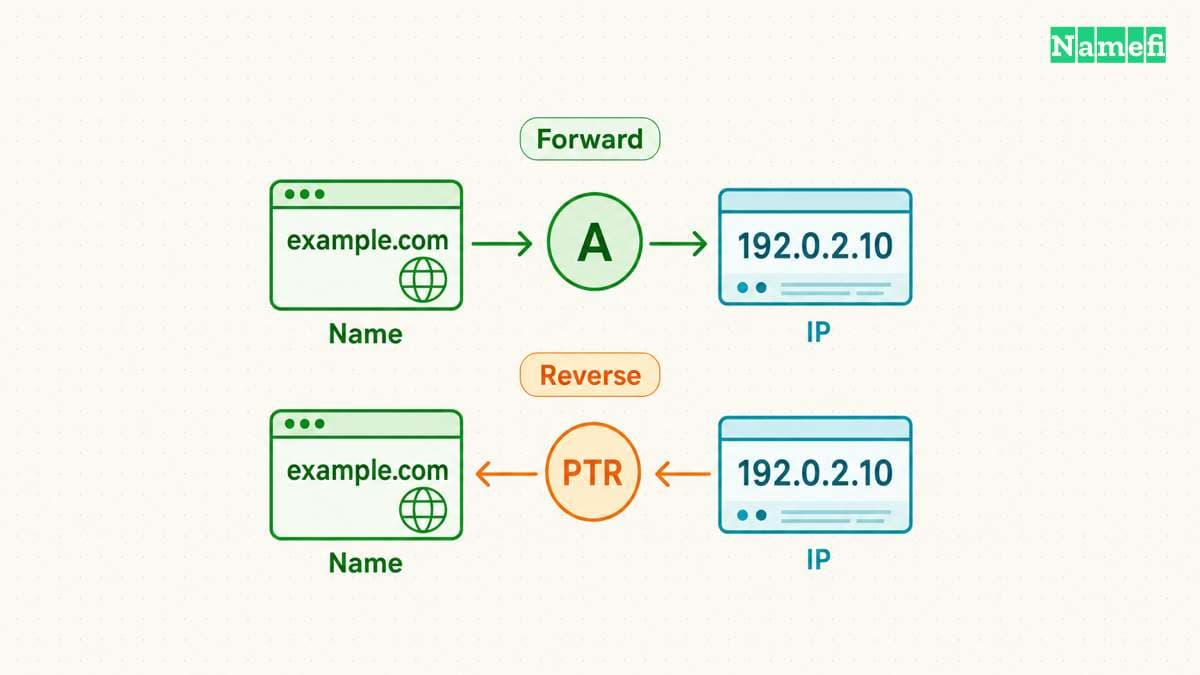
An ordinary address lookup begins with a hostname. A reverse lookup begins with an address and asks for PTR data. IPv4 reverse DNS uses the in-addr.arpa namespace. RFC 1035 defines the address-based structure.
For the hypothetical address 192.0.2.20, the reverse name is 20.2.0.192.in-addr.arpa. The reversed octets let DNS delegate parts of the reverse namespace according to address space. A PTR record at that name can point to a hostname such as mail.example.com.
The example is a syntax illustration. The address and hostname do not represent a server configured by this article. Query your assigned address rather than copying the example and expecting an operational result.
IPv6 uses a different reverse representation under ip6.arpa. You do not need to construct that representation by hand when using dig -x. ISC documents support for both IPv4 and IPv6 inputs. The utility handles the reverse-name conversion.
A useful lookup preserves the full response
Run the basic query first. If you need a compact answer afterward, run dig -x 192.0.2.20 +short. The full response is more useful when the answer is empty or the query fails.
For a saved diagnostic record, capture the address, query time, DNS server, response status, answer, and TTL. Those details help another administrator reproduce the observation. A screenshot containing only a hostname leaves important context out.
Use a public browser tool if command-line tools are unavailable. The Google Admin Toolbox Dig interface provides DNS queries. Its instructions describe name entry and output. For an IPv4 PTR query, enter the reversed in-addr.arpa name and select PTR.
As practical advice, avoid pasting private logs or credentials into a public lookup service. A DNS query needs the address or query name, rather than the whole incident report. Use an approved internal resolver for internal-only address space.
Choose Reverse DNS (PTR) in Namefi's DNS lookup and enter the full IP address. Save the resolver, answer owner, PTR target, and timestamp. The result reports reverse-zone data observed through that resolver, not a verified legal owner or an inventory of every hosted domain.
A missing answer and a failed query mean different things
An answer containing a PTR hostname means DNS returned that published mapping. Record the hostname exactly. Do not assume that a friendly-looking label proves the server belongs to a particular business.
An empty answer needs closer inspection. A name error and a successful response without PTR data describe different DNS states. A timeout describes a query that did not obtain a usable response. Avoid labeling all three observations as “no reverse DNS.”
Check the full status before changing records. If the request timed out, test resolver reachability and retry through an approved alternative. If the reverse zone provides no PTR, identify the address provider's reverse DNS process.
RFC 1035 warns that forward and reverse data can be inconsistent because the records live in different zones. The standard explicitly describes that possibility. A missing or unexpected PTR therefore needs investigation rather than a conclusion about whether a website exists.
Forward confirmation tests consistency across both directions
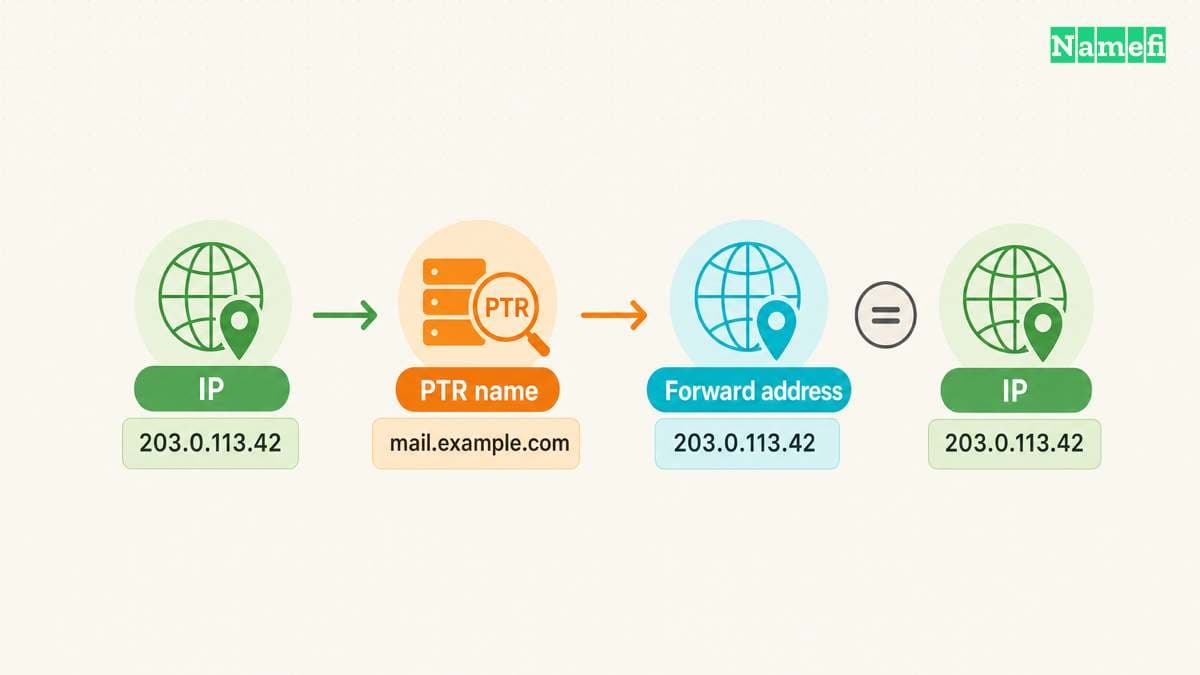
Suppose the hypothetical PTR result is mail.example.com. Query that hostname's A records for an IPv4 address, or AAAA records for IPv6. Compare the returned addresses with the original address.
If the original address appears, the two observations agree for that address family at that moment. If the original address does not appear, record the mismatch and inspect both configurations. This is a practical consistency test, rather than proof of identity or authorization.
Do not substitute a website's visible domain for the PTR target during the comparison. Check the exact returned hostname. Shared infrastructure can use service-specific hostnames that differ from customer website names.
Also keep the result's scope narrow. A PTR lookup does not enumerate all names pointing toward an address. A shared host or proxy can serve many domains. The reverse query returns reverse-zone data rather than searching every forward DNS zone.
The address provider usually supplies the repair route
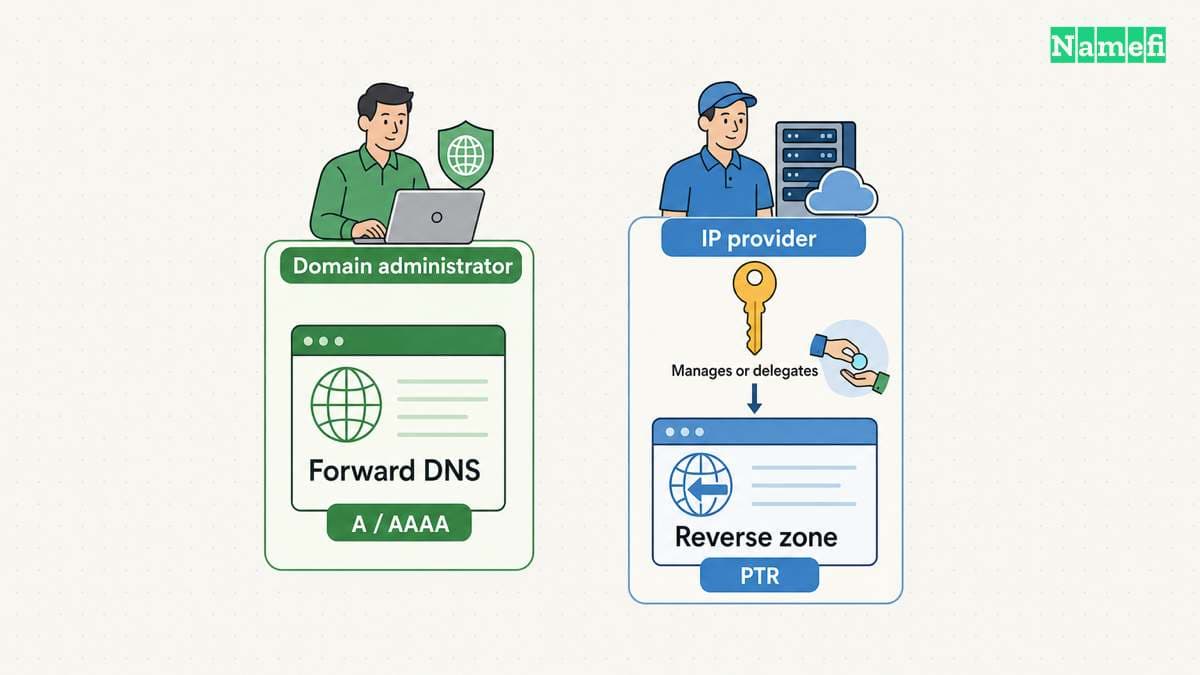
The reverse namespace follows address delegation. Registering example.com gives no automatic authority over the reverse zone for a rented server address. The reverse DNS structure explains that separation.
Find the provider that assigned the address. Look for a reverse DNS or PTR setting in the server account. If the account has no setting, ask support which party manages the reverse zone. Provide the assigned address and the desired hostname without exposing account secrets.
Prepare the forward hostname before requesting the change. Then verify the reverse and forward answers independently after the provider confirms publication. Keep the old and new observations in the same incident record.
For mail troubleshooting, treat the PTR result as one diagnostic input. A consistent PTR does not prove that a mailbox exists, authenticate a message, or guarantee delivery. Use the PTR configuration guide for the server-side work and keep email authentication checks separate.
If a recent change appears inconsistent, compare current published data with cached answers before submitting another change. The DNS cache timing guide explains why a resolver can still return a previous mapping. The immediate next action is to save one full reverse response and verify its exact hostname in forward DNS.
Sources and further reading
ISC documents reverse dig queries
ISC documents reverse dig queries. Checked 2026-10-30.
RFC 1035 defines reverse IPv4 queries
RFC 1035 defines reverse IPv4 queries. Checked 2026-10-30.
Google provides a browser DNS tool
Google provides a browser DNS tool. Checked 2026-10-30.
RFC 2606 reserves example domains
RFC 2606 reserves example domains. Checked 2026-10-30.
RFC 5737 reserves documentation addresses
RFC 5737 reserves documentation addresses. Checked 2026-10-30.
About the author(s)
Fenwei Bian is a software developer in her thirties who spends her working hours in pull requests and her weekends with her hands in soil or sawdust. Years of open source on GitHub taught her that names are interfaces: a good one is clear, honest about what it does, and kind to whoever has to use it next.
She gardens because it rewards patience and punishes wishful thinking, and she does woodwork because a joint either fits or it doesn't. Both habits show up in how she writes about naming — measure twice, check the source, and don't sand over a rough spot and hope no one notices.
For Namefi she writes about how domain markets actually move, the practical trade-offs of tokenizing and flipping names, and picking a domain you'll still be glad you own in twenty years.