Best Web Hosting: Which Provider Fits Your Website and Budget?
Choose web hosting by website type, operating responsibilities, recovery needs, and the full recurring cost.

- domains
- guide
The best web host is the provider whose exact plan supports your website, your maintenance skills, and your recurring budget. Start with website type: a static project, a managed publishing site, and a custom server application need different evaluations.
For a code-based static site, consider GitHub Pages. For a WordPress publishing workflow with included hosting and updates, consider WordPress.com. For a team that needs virtual servers or related cloud resources, evaluate Amazon Lightsail. These are fit-based starting points, not measured rankings. The official documentation describes GitHub Pages, WordPress.com, and Lightsail.
This guide helps build a shortlist without invented speed tests or universal price claims. The cloud-versus-shared guide examines the infrastructure decision separately.
Match the shortlist to the website you need
Write down the essential user actions before comparing plans. A portfolio may need only page publishing. A booking site may need forms, payment integration, and an administrator workflow. A custom application may need a specific runtime and database.
Use the following table as an editorial starting point:
| Website requirement | Provider to investigate | Verify before buying |
|---|---|---|
| Publish static files from a repository | GitHub Pages | Repository workflow, service limits, and intended use |
| Publish through WordPress with platform management | WordPress.com | Exact plan features, custom domain, and export options |
| Operate a virtual server or related cloud resources | Amazon Lightsail | Administration, backup design, and total resource cost |
| Run supported software through a simple hosting account | A shared-hosting plan | Runtime support, resource limits, and support scope |
GitHub Pages publishes static HTML, CSS, and JavaScript from a repository. Its documentation defines the service. Evaluate a separate service when the project requires server-side application execution.
WordPress.com includes hosting and automatic WordPress software updates. The plan guide states those features. Check the selected tier instead of assuming every advanced feature accompanies an entry plan.
Lightsail offers instances, containers, databases, and storage. AWS lists the available resource types. Choose the components the application requires, and assign someone to operate the resulting configuration.
Compare an exact plan rather than a provider's reputation
A provider can sell several products with different limits. Record the product name, plan, billing term, currency, and included services. Keep a dated copy of the quoted terms.
WordPress.com currently lists plugin installation on paid plans, while its Business plan adds capabilities including staging and database management. The current plan guide describes those distinctions. An older comparison may describe retired plan boundaries, so use the current official page.
For any host, ask how the plan handles required extensions, database versions, scheduled tasks, and file uploads. Ask whether staff can create a staging copy and restore a backup without rebuilding the site manually.
Use a real requirement as a support question. For example: “Can this plan run the booking software and required extension version?” A specific response is more useful than a broad claim about excellent support.
If the application already works elsewhere, list the current configuration before requesting a migration quote. Identify which tasks the provider performs and which tasks remain yours.
Budget for the recurring service and the people who operate it
Use live provider quotes rather than a generic cheapest-host list. WordPress.com states that plan cost can vary by country currency and billing choice. Check the pricing route from its plan guide.
Compare the same period and scope. Include the renewal rate, required backups, storage, usage charges, support, and application licenses. Keep domain registration and email service as separate lines unless the offer expressly includes them.
Write down a cost for required outside administration using an actual quote. If the cost is unknown, keep the field unknown. Do not treat unpaid maintenance time as proof that the hosting service costs nothing to operate.
For a cloud configuration, ask what event increases the bill. Decide who receives usage alerts and who can approve expansion. Keep optional development environments separate from the production budget.
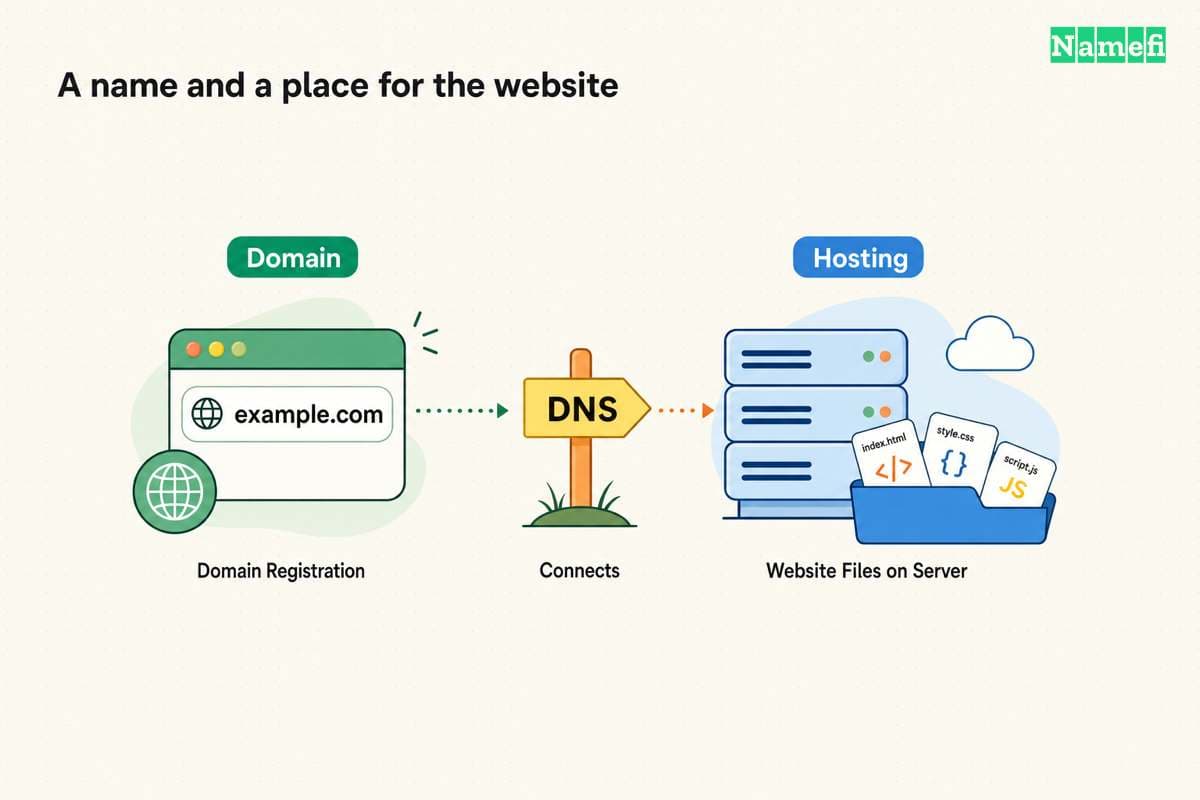
For a bundled offer, check what happens when the introductory term ends. Ask whether moving the domain changes any hosting or email benefit. The domain-versus-hosting explanation helps separate those services.
Test the work that matters before moving the domain
Treat performance as a question to test on the actual application. This article has no comparative benchmark that establishes one provider as fastest.
Build a permitted evaluation copy. Use representative pages, images, forms, and application data. Test from the audience's relevant locations and devices when possible. Record the test conditions so later results remain comparable.
Test important uncached actions as well as page viewing. A fast home page does not establish a working search, login, or checkout workflow.
Ask about limits before interpreting a failure. Shared hosting can expose a site to activity from other sites on the server, according to AWS's shared-hosting explanation. Read that documented limitation. The observation supports asking about resource boundaries, not assuming every shared host performs poorly.
For a proposed upgrade, request evidence that the upgrade addresses the observed constraint. Keep application defects and hosting capacity questions in separate investigation notes.
Verify recovery and access before committing
Create a short responsibility record. Assign software updates, security changes, backups, restoration, billing, and account recovery to named people or contracted services.
AWS notes that VPS hosting can require technical expertise. Its hosting guide describes that operating requirement. A server plan suits a team only when the team can meet the maintenance requirement or purchase appropriate management.
Request individual administrator accounts and restrict access to authorized people. Check how the team removes a contractor's access and retains recovery control.
Test restoration during evaluation when the provider permits it. Define success as a usable site with the necessary files and data. Keep the restore procedure with the account record.
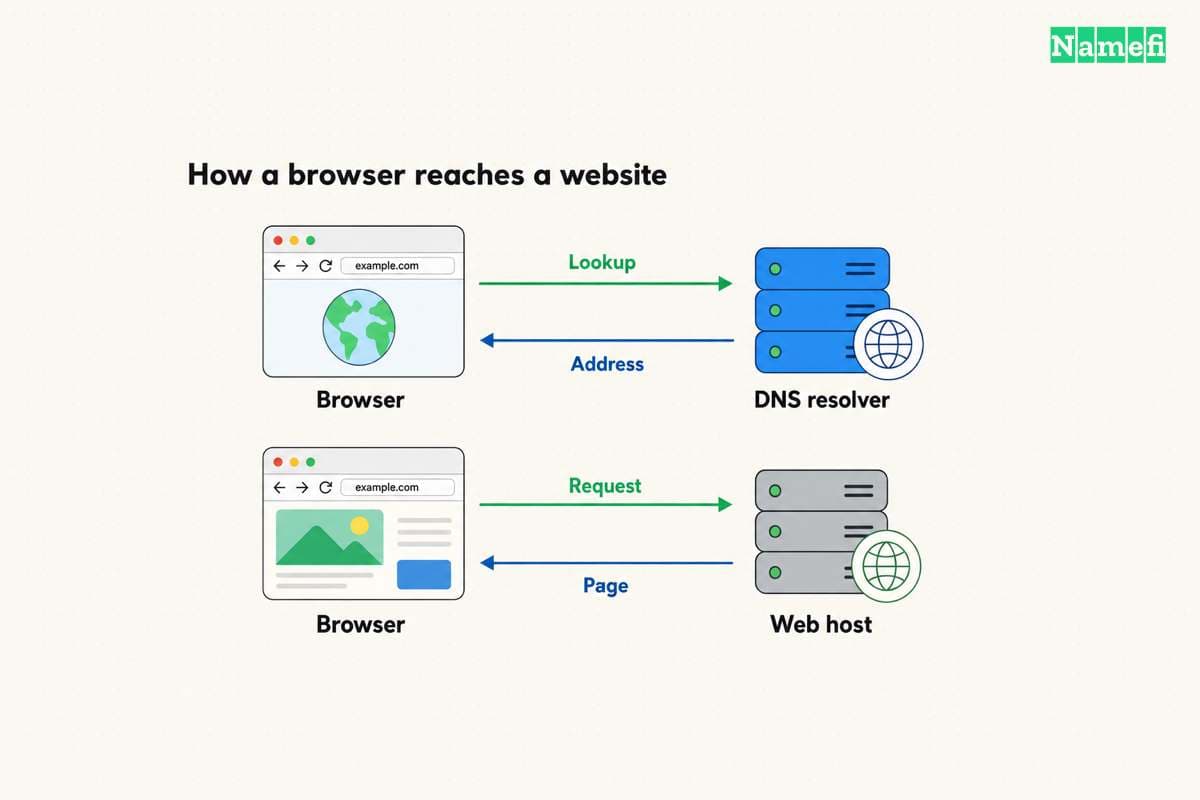
Before migration, verify the destination through its supported preview method. Preserve existing DNS and mail settings, prepare rollback, and change only the intended website records.
Your next action is to shortlist providers against written requirements, request exact quotes, and test the essential workflow. Select the plan whose documented capabilities and operating work fit the website. Save the reasons so the team can revisit the decision when requirements change.
Sources and further reading
GitHub describes its static hosting service
pages official source — fetched 2026-10-30 UTC.
WordPress.com includes hosting and updates
wp-host official source — fetched 2026-10-30 UTC.
WordPress.com documents plan capabilities
wp official source — fetched 2026-10-30 UTC.
AWS describes Lightsail resources
lightsail official source — fetched 2026-10-30 UTC.
AWS explains shared and cloud hosting
aws-hosting official source — fetched 2026-10-30 UTC.
About the author(s)
Fenwei Bian is a software developer in her thirties who spends her working hours in pull requests and her weekends with her hands in soil or sawdust. Years of open source on GitHub taught her that names are interfaces: a good one is clear, honest about what it does, and kind to whoever has to use it next.
She gardens because it rewards patience and punishes wishful thinking, and she does woodwork because a joint either fits or it doesn't. Both habits show up in how she writes about naming — measure twice, check the source, and don't sand over a rough spot and hope no one notices.
For Namefi she writes about how domain markets actually move, the practical trade-offs of tokenizing and flipping names, and picking a domain you'll still be glad you own in twenty years.