A Public DNS Resolver Should Match Your Privacy and Recovery Needs
Choose a public DNS resolver by privacy, DNSSEC, filtering, and recovery behavior, then test the settings your devices actually use.

- dns
- privacy
- networking
- security
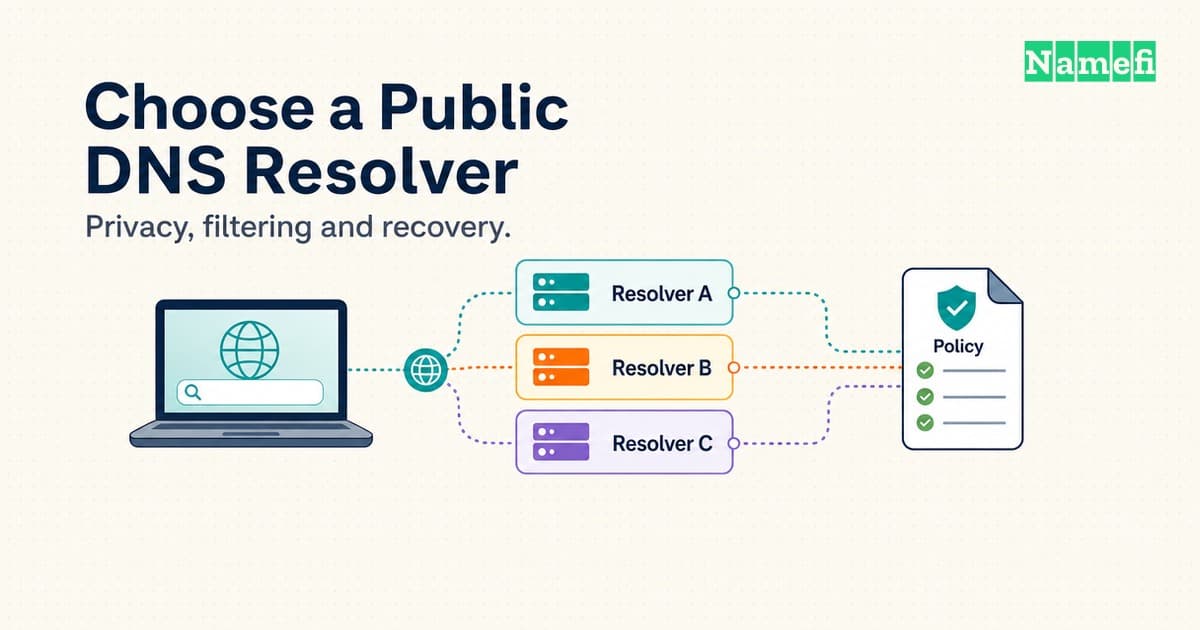
Start with the policy you want, then choose a resolver and test the complete connection. An easy-to-remember address does not settle the decision.
Cloudflare's standard service suits readers who want a documented option without content filtering. Quad9's secure service suits readers who want threat blocking. Google Public DNS offers another documented option with DNSSEC validation and encrypted transports. These are conditional starting points, not a universal ranking.
A useful choice must survive ordinary work: browser lookups, video calls, a corporate VPN, and a network that blocks the selected encrypted connection. The following process compares three public services and shows how to test a reversible change. The process does not rank every available resolver.
A resolver choice changes who answers your device
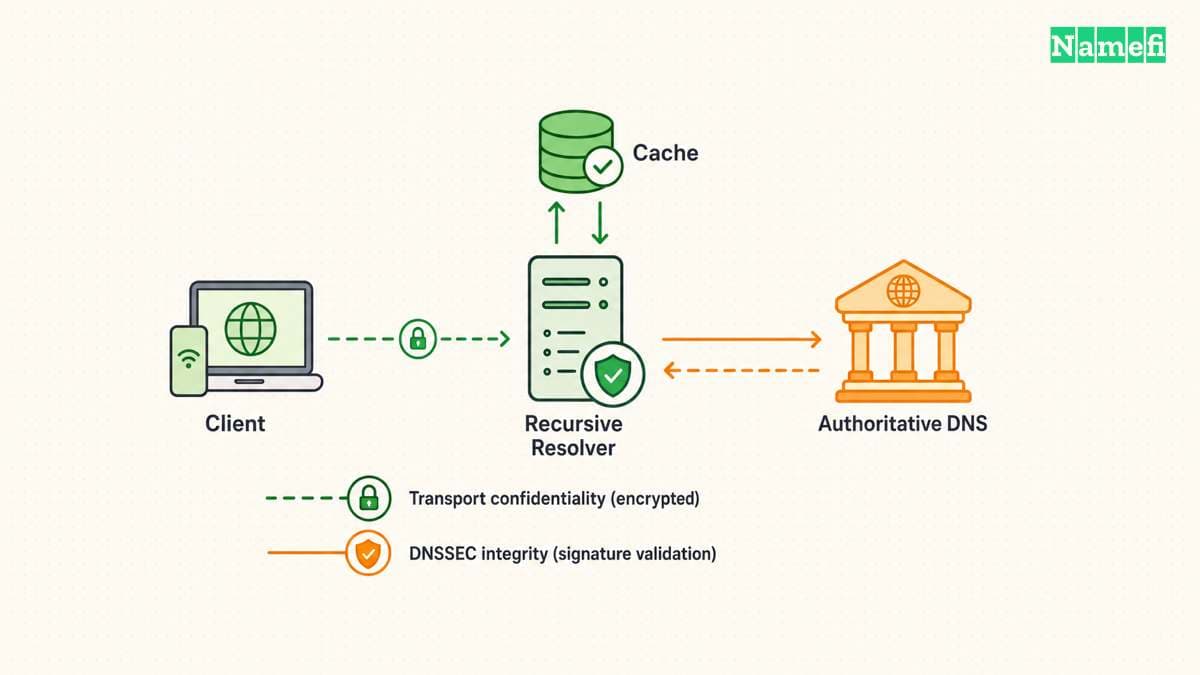
The Domain Name System supplies information associated with names, including addresses that applications use for connections. A DNS resolver retrieves answers for clients and can reuse cached information. The resolver follows referrals when local information cannot answer the query, as RFC 1034 explains.
Changing a device's resolver selects a different service for lookups. Changing a domain's authoritative nameservers changes where the domain publishes DNS information. A public resolver setting cannot repair a missing record at the authoritative source. The distinction matters when a website fails immediately after a domain change.
Begin by writing one requirement in plain language. For example: “I want encrypted lookups without content filtering,” or “I want a resolver that blocks known malicious domains.” A third requirement might preserve a company's internal names through a managed VPN. Each requirement leads to different settings, even when several providers support the same transport.
Separate four questions before comparing brands. Who receives the query? Does the client encrypt the connection? Does the resolver validate signed DNS data? Does the selected service apply a block policy? A provider name alone answers none of these questions completely.
DNSSEC authenticates signed DNS data and protects integrity. DNSSEC does not encrypt queries or determine whether a website deserves trust. RFC 4033 describes these limits. A correctly signed record can still point to a harmful website that the domain operator intentionally published.
Encrypted DNS protects a different boundary. DNS over TLS secures the connection between a client and a resolver, as RFC 7858 specifies. The resolver still needs to process the query. Encryption therefore does not remove the need to examine the operator's data policy.
The client boundary also matters. A browser can select its own encrypted resolver while another application uses the operating system's resolver. Mozilla documents browser-specific protection levels and fallback behavior. A successful browser check cannot establish that every application follows the same route.
For a managed work device, begin with the administrator's configuration. Treat the required internal naming behavior as a requirement of the comparison. Public DNS can remain useful for a personal device without becoming an appropriate replacement for every workplace configuration.
Provider policies narrow the practical shortlist
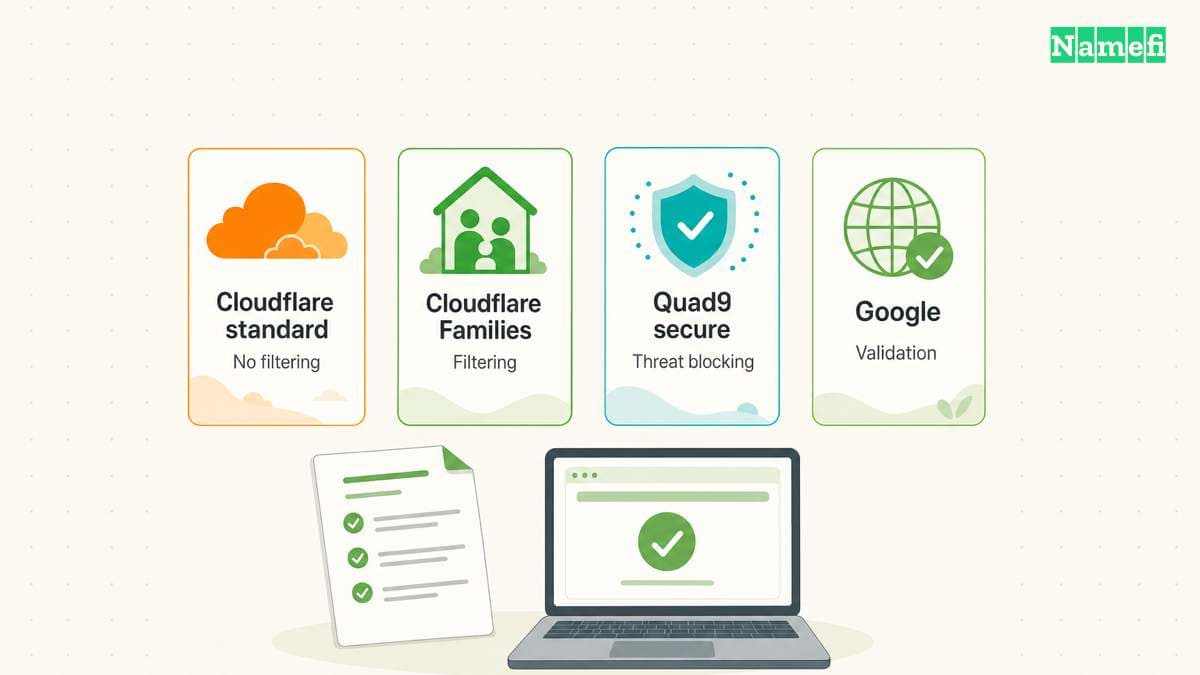
Compare the exact service variant, not just the company. Cloudflare's standard resolver has no content filtering. Cloudflare publishes separate Families services for malware filtering and adult-content filtering. The official address list identifies each variant.
The following shortlist focuses on documented choices. The final column states what a reader should verify before deployment.
| Service | Useful starting point | Check first |
|---|---|---|
| Cloudflare standard | No content filtering | Logging policy and encryption |
| Cloudflare Families | Category filtering | Correct filter variant |
| Quad9 secure | Threat blocking | False-positive recovery |
| Google Public DNS | Validating public DNS | Data policy and local tests |
Use the exact address pair for the service you select. The table lists standard Cloudflare, secure Quad9, and Google Public DNS.
| Service | IPv4 addresses | IPv6 addresses | DoT hostname |
|---|---|---|---|
| Cloudflare standard | 1.1.1.1, 1.0.0.1 | 2606:4700:4700::1111, 2606:4700:4700::1001 | one.one.one.one |
| Quad9 secure | 9.9.9.9, 149.112.112.112 | 2620:fe::fe, 2620:fe::9 | dns.quad9.net |
| Google Public DNS | 8.8.8.8, 8.8.4.4 | 2001:4860:4860::8888, 2001:4860:4860::8844 | dns.google |
The providers publish these Cloudflare addresses, Quad9 settings, and Google addresses. Cloudflare documents its DoT hostname. Google documents its encrypted endpoints. Quad9 includes its encrypted endpoints in the service table.
For Cloudflare Families, the malware-filtering IPv4 pair is 1.1.1.2 and 1.0.0.2. The malware-and-adult-content pair is 1.1.1.3 and 1.0.0.3. Use the corresponding service instructions for encrypted DNS. The standard service's endpoint does not select a Families filter.
An ordinary DNS address field accepts an IP address. A DoT hostname field requires the provider hostname. A custom DoH field requires a provider-supported HTTPS endpoint. Entering an IP address alone does not establish encryption. Our DoH and DoT comparison explains the difference.
Privacy comparisons must distinguish data fields and exceptions
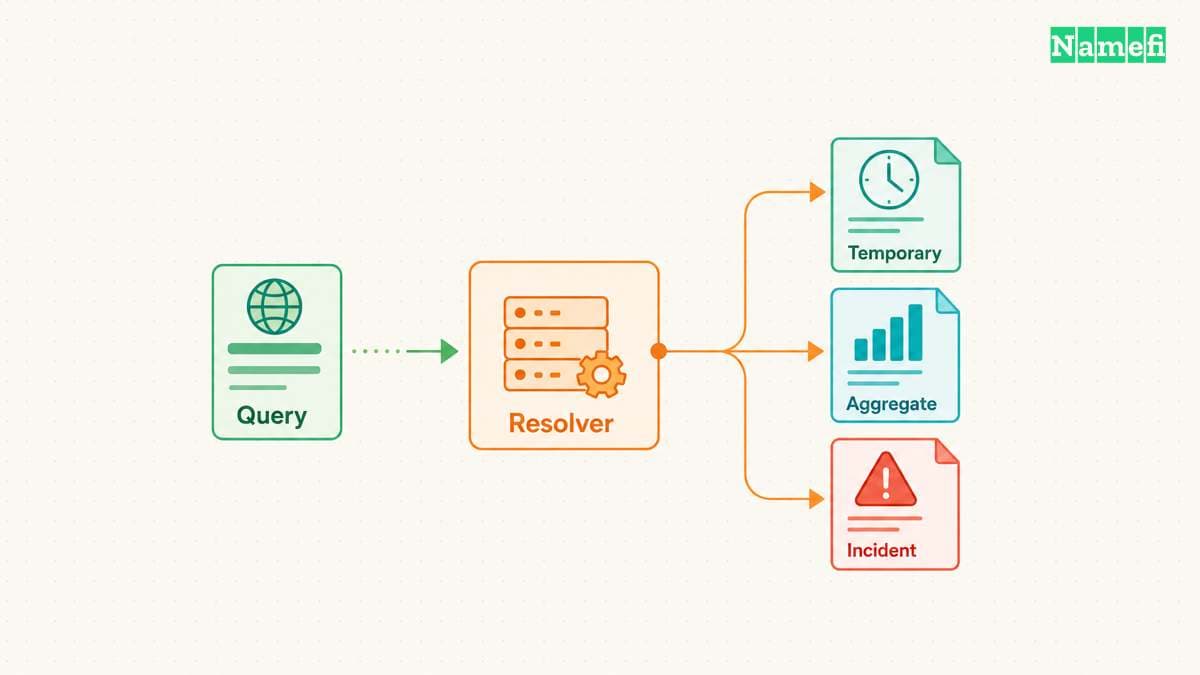
Each provider defines different collection rules for the illustrated categories.
An encrypted connection still delivers the query to the resolver. Compare the stored data, retention rules, sharing, and exceptions separately. A “no logs” label cannot describe every data category.
| Provider policy | Ordinary address handling | Data that can remain | Exception to examine |
|---|---|---|---|
| Cloudflare public resolver | Truncated addresses expire within 25 hours | Limited samples for aggregations and indefinite aggregate statistics | Random network packet samples |
| Google Public DNS | Temporary logs pair client addresses with queries | Permanent samples replace addresses with city or region | Security and abuse retention |
| Quad9 | Normal processing keeps reply addresses in volatile memory | Aggregate counters and query-label statistics | Diagnostic records under anomalous conditions |
Cloudflare lists query names, timestamps, response details, network numbers, and countries among its resolver log fields. Cloudflare commits to deleting ordinary resolver logs within 25 hours. Cloudflare excludes limited samples for aggregations from that rule and permits indefinite retention of aggregate data. Cloudflare also permits random network packet capture from at most 0.05% of traffic to its network infrastructure. That exception supports troubleshooting and denial-of-service mitigation. APNIC can access anonymized query metadata, including query names, but cannot access client IP addresses. Read Cloudflare's complete data categories before treating 25 hours as a universal retention limit.
Google's temporary logs contain client addresses and query details. Google subjects those logs to deletion processes within 24–48 hours, with longer retention for security and abuse issues. Permanent samples replace addresses with city or region information. Permanent fields include requested names, timestamps, transport, and the client's autonomous system number. Google prohibits personal DNS data use for ad targeting. Google's promise against association with other Google-service personal information also has a security and abuse exception. The Google Public DNS policy states those limits separately.
Quad9's normal policy keeps reply addresses in volatile memory during processing or the stateful connection. Quad9 says the service does not persist user IP addresses or substitutes that identify individuals. Quad9 can retain aggregate counters and query-label statistics permanently. Quad9 can also license aggregate traffic summaries, including for a fee, without sharing personally identifiable information. These commitments concern different data classes, as Quad9's normal policy explains.
Quad9's anomalous-conditions policy also covers software failures and protocol faults, alongside attacks and malicious use. Diagnostic collection can include related IP addresses. Queries associated with the diagnosed cause can enter permanent archives with source addresses, names, and timestamps. A short “never stores addresses” statement therefore needs the normal-conditions qualification.
Choose the requirement before choosing the provider. A requirement against routine persistent user-address logs differs from a requirement against permanent aggregate statistics. A requirement against incident-record retention needs another comparison. None of these policies establishes anonymity or removes the resolver's visibility while processing a query.
For validation, Google explicitly documents DNSSEC support. Quad9 documents DNSSEC failures in its troubleshooting guidance. Check the chosen variant's current documentation rather than assuming that every address from one operator has identical behavior.
Your requirements determine which resolver enters the trial
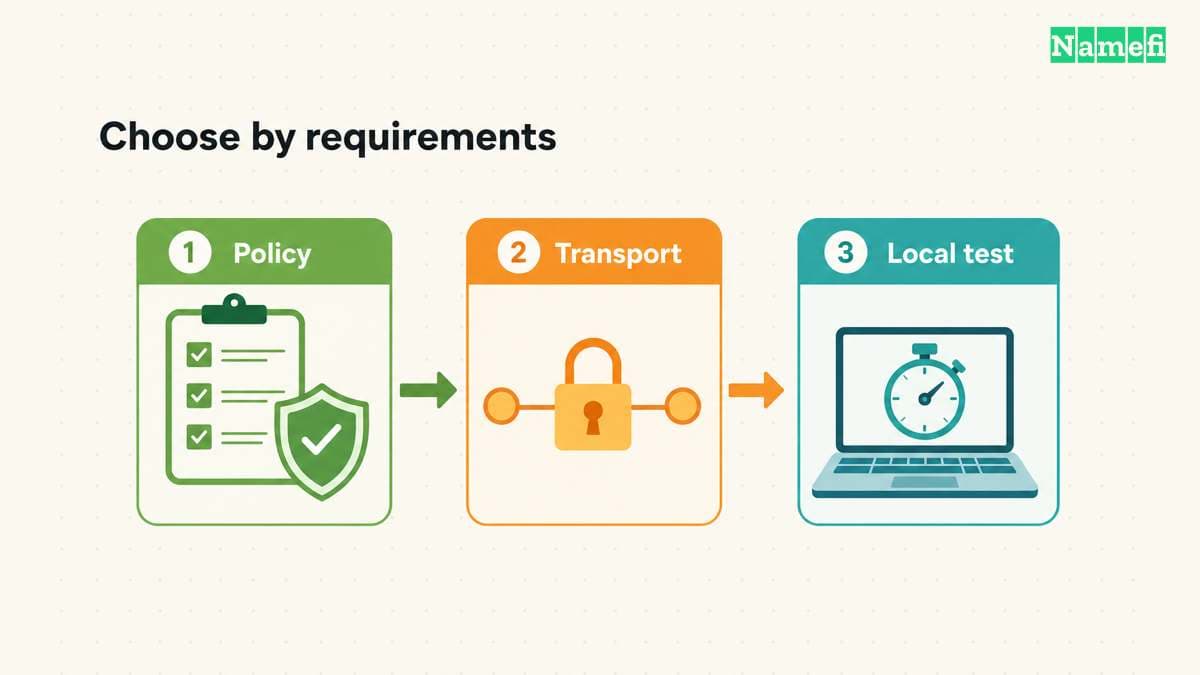
Policy comes first, supported transport comes second, and local results settle the final choice. Apply the following checks before changing a router.
| Requirement | Candidate to test | Acceptance check |
|---|---|---|
| Public DNS without content filtering | Cloudflare standard or Google Public DNS | Required public names resolve and the data policy fits |
| Threat blocking | Quad9 secure or Cloudflare Families malware service | The exact filter works and the correction process is acceptable |
| Adult-content filtering | Cloudflare Families adult-content service | The intended category filter works on the tested device |
| Encrypted lookups | A documented DoH or DoT endpoint supported by the client | The configured path uses encryption and has acceptable fallback |
| Workplace internal names | The administrator's approved configuration | Required internal names still resolve through the approved path |
A household can follow a simple sequence:
- Write down the required filtering policy.
- Choose two candidates that meet the same requirement.
- Check the client's supported encrypted transport.
- Test both candidates on the same device and connection.
- Keep the candidate that meets the requirements reliably.
Performance requires a local trial at more than one time. Google's performance explanation separates network delay from cache misses. A name new to your device can already exist in a public resolver's cache. A first query therefore does not prove an empty resolver cache.
Record the hostname, record type, selected service, transport, response code, lookup duration, time, and network. Separate first-query results from repeated-query results. Compare failures before small timing differences. The guide provides no measurements that establish a universally fastest DNS server.
A DNS speed test measures lookup behavior. Keep application outcomes in a separate column and test the applications you actually need. Readers comparing gaming results can use the local DNS benchmark guide for the detailed measurement procedure.
Filtering and validation require different recovery decisions
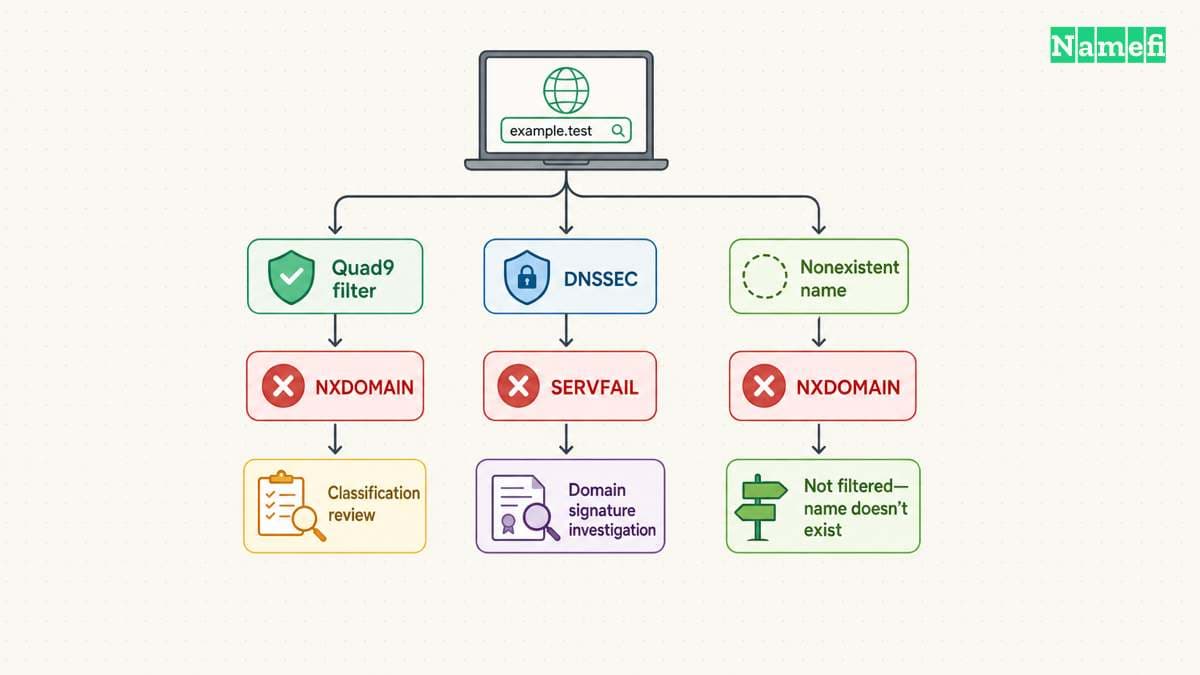
Threat blocking and DNSSEC validation can both stop a lookup, but the appropriate response differs. A filtering service can reject a name because the service classifies the name as harmful. A validating resolver can reject signed data because the validation process cannot establish authenticity.
Quad9 documents a concrete distinction: a blocked name can produce NXDOMAIN, while DNSSEC authentication failure produces SERVFAIL. A genuinely nonexistent name can also produce NXDOMAIN. Consult Quad9's block identification guidance, including the blocked-domain tester, before interpreting a browser's generic error.
Do not turn these observations into a universal error decoder. SERVFAIL can indicate problems beyond validation. A resolver response describes a lookup result, not a complete explanation of the website's condition. Google's troubleshooting guide provides additional diagnostics for validation and nameserver problems.
Consider a hypothetical household using threat blocking. One required website stops loading while unrelated sites work. Record the full hostname and check the provider's diagnostic service. If the provider confirms a block, review the website before requesting a classification correction. Automatically switching to an unfiltered service would discard the household's original requirement.
Now consider a hypothetical domain owner whose signed domain returns validation errors. The owner should inspect the domain's DNSSEC configuration with the DNS operator. The owner should preserve validation for normal browsing. Making a misconfigured domain load through a different policy does not repair the underlying signature problem.
Filtering also has limits of granularity. DNS lookups concern names, so a resolver choice does not provide a complete review of page content or application behavior. Treat DNS filtering as one control in a broader device configuration. Do not promise that a threat-blocking resolver will detect every harmful destination.
Decide how a false positive will reach someone who can act. A household may need one person to review reports. A small office may need a support contact and a documented exception process. The operational burden belongs in the selection decision, alongside the filter's stated purpose.
Check optional information sharing as well. Quad9's ECS explanation says an ECS variant can send part of the client address to authoritative servers. The information can help content providers choose geographically suitable answers. The option also changes upstream disclosure. Select an ECS variant deliberately rather than copying a nearby address from a comparison chart.
Different answers do not automatically establish DNS hijacking. A filter policy, an unexpired cache entry, or an authoritative configuration difference may explain the result. Compare evidence before assigning a cause. Escalate a suspected interception with the observed hostname, response, time, and network details.
A reversible trial verifies the resolver and its fallback
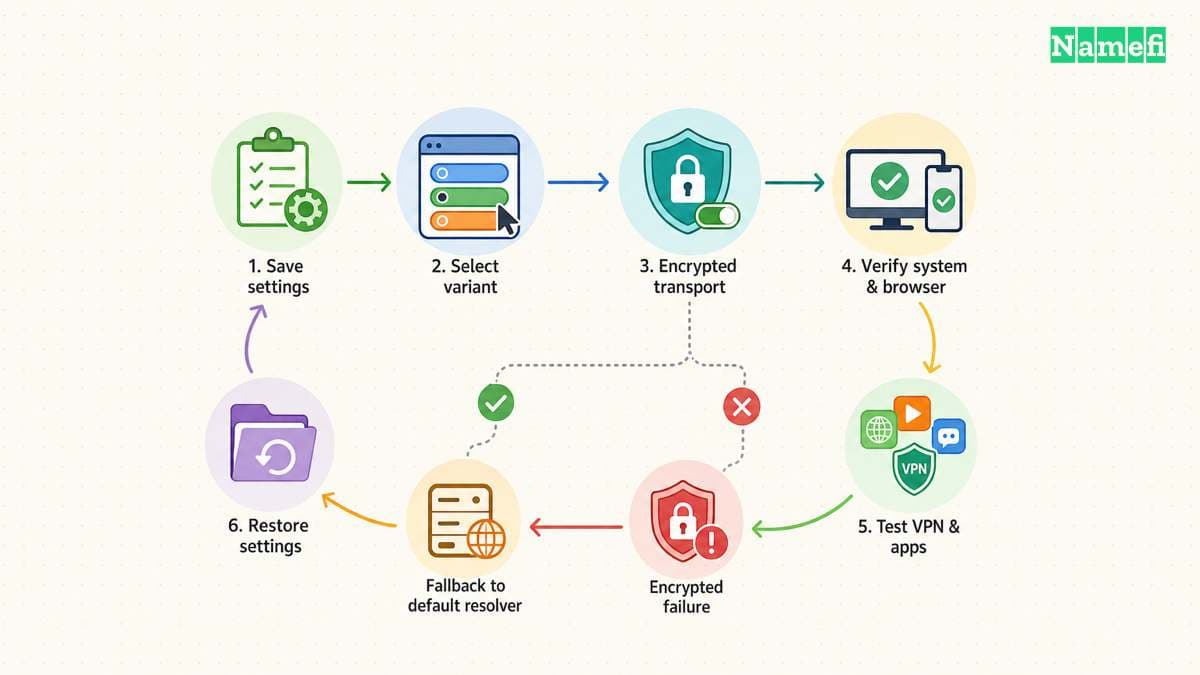
Start on one personal device that can tolerate a configuration test. Save the current DNS settings and note whether the network supplies DNS automatically. Google explicitly recommends preserving the previous settings before a change. Keep the recovery instructions available without depending on a working DNS lookup.
Choose one configuration level for the first trial: browser, operating system, or router. Record the chosen level so the result has a clear scope. Router settings can affect other people, so expand the trial only after the individual device works. Follow current vendor instructions instead of copying instructions for another operating system version.
Check IPv4 and IPv6 separately when the device offers separate DNS settings. The provider documentation lists addresses for both families. Also inspect browser secure-DNS settings and VPN behavior. A device can contain several relevant settings, and a screenshot of one field cannot establish the path of every query.
For a basic comparison, use nslookup example.com 9.9.9.9 and nslookup example.com 8.8.8.8 where the tool is available. These commands request answers from named servers without changing stored settings. Treat the results as direct lookup tests. The commands do not prove that the browser uses the tested service or that the transport encrypts traffic.
Quad9 supplies a separate protocol check. A lookup with dig +short txt proto.on.quad9.net. can report how Quad9 received the query. The official protocol test lists responses for plaintext DNS, DoH, and DoT. Run the test through the configured system path and interpret the result within that path's scope.
Exercise ordinary tasks after configuration. Open required sites, reconnect the VPN, and test another application that uses names. Repeat the checks after changing networks. A controlled trial should include a return to the saved settings so the recovery procedure receives a practical test.
Read the client's failure policy before relying on encryption. Firefox's default protection can fall back to default resolvers when problems occur. Max protection instead displays a warning when secure resolution fails. Mozilla documents the differences. Select availability or strict encrypted resolution consciously, and check the equivalent behavior in the actual client.
Keep alternate servers consistent with the intended policy unless the client explicitly supports a more precise arrangement. An unfiltered alternate does not preserve an all-filtered requirement. A plaintext fallback does not preserve an all-encrypted requirement. Document the acceptable failure behavior before adding a second provider.
Finally, allow for cached answers. The TTL limits ordinary cache reuse, and Google documents stale-answer diagnostics after DNS changes. Compare the exact hostname and record type before deciding that the new service failed. Restore the previous settings if the trial breaks required access, then investigate with the saved observations.
The result should be a short configuration record: selected service, exact variant, transport, configuration level, fallback behavior, and recovery method. That record provides a stronger basis for continued use than a speed ranking or a familiar address.
Sources and further reading
The privacy policies below were fetched again on 2026-10-22 UTC. Other sources were fetched on 2026-10-21 UTC. Product policies and platform behavior can change.
- Cloudflare: IP addresses, “1.1.1.1” and “1.1.1.1 for Families.”
- Cloudflare: Public DNS Resolver privacy, privacy commitments and APNIC sharing.
- Google: Your Privacy, temporary and permanent DNS logs.
- Google: Get Started, preparation and IP addresses.
- Google: Security Benefits, DNSSEC and encrypted transports.
- Quad9: Services, secure service and other variants.
- Quad9: Anomalous Conditions, diagnostic collection and permanent incident archives.
- Quad9: Data and Privacy Policy, applicability and IP-address treatment.
- Quad9: FAQs, protocol test, block identification, and ECS.
- Mozilla: Firefox DoH protection levels.
- IETF: RFC 4033, sections 3–5 and 12.
- IETF: RFC 7858, introduction and TLS sessions.
- IETF: RFC 1034, resolver algorithm and cache behavior.
- Google: Performance benefits, network latency and cache misses.
- Cloudflare: DNS over TLS, standard-service hostname.
- Google: Secure transports, DoH and DoT endpoints.
- Google: Troubleshooting, domain failures and incorrect answers.
About the author(s)
Namefi is a collective of engineers, designers, and operators who obsess over building tools that make managing your onchain domain names effortless.