How to Get an SSL Certificate With Cloudflare and Turn On HTTPS
Set up Cloudflare Universal SSL, protect the origin with Full strict, verify hostname coverage, and test HTTPS redirects.

- domains
- guide

Cloudflare normally issues a free Universal SSL certificate after a domain becomes active on Cloudflare. For a secure proxied website, also configure a valid origin certificate and select Full (strict). Then verify HTTPS and add the intended HTTP redirect. Cloudflare treats certificate choice, encryption mode, and HTTPS enforcement as separate tasks. Its setup guide explains those tasks.
The important distinction is the two connections: browser to Cloudflare, and Cloudflare to your web server. A browser-facing certificate alone does not confirm that the second connection meets your requirements. Cloudflare documents both connections.
This guide covers a website using Cloudflare's proxy. For a general certificate installation workflow, read how to install an SSL certificate.
Prepare the website and preserve the DNS configuration
Identify the hostnames that should serve the website. Include the apex domain, any www address, and deeper application hostnames that actually exist.
Use your hosting provider's supported configuration for the origin server. Confirm who can install certificates and manage HTTPS. Restrict account access to authorized administrators and keep private keys out of messages and public files.
Before changing nameservers, save the full DNS configuration and verify the migration plan. Preserve mail routing and verification records alongside website records. The DNSSEC guide explains the signing and delegation coordination required for a signed domain.
Do not treat changing the registrar as a prerequisite for this SSL workflow. Focus on the actual DNS setup and web service configuration required by your selected Cloudflare integration.
As a practical release plan, prepare a known working origin, a certificate coverage list, and a rollback owner before moving a live site.
Verify Universal SSL coverage and activation
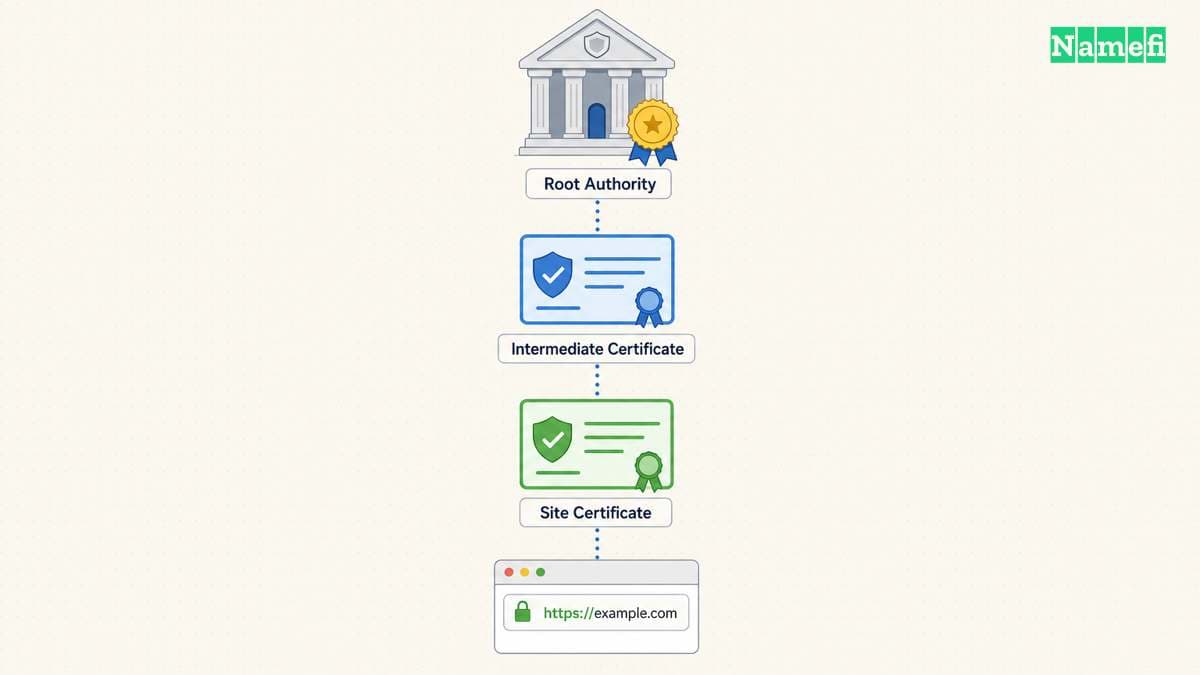
Cloudflare documents automatic issuance and renewal of publicly trusted Universal SSL certificates for activated domains. In a full DNS setup, coverage includes the apex and first-level subdomains. Deeper subdomains need another supported coverage arrangement. Read the Universal SSL scope.
For example, a full setup's apex and first-level hostname require a different coverage check from a hostname with additional subdomain levels. Inspect the actual certificate rather than assuming a wildcard covers every depth.
Open the domain's SSL/TLS → Edge Certificates settings and inspect certificate status. Cloudflare's activation instructions explicitly provide that status check. Follow the activation procedure.
Wait for the required certificate to become active before completing a migration that depends on that certificate. Cloudflare lists keeping records unproxied until activation as one downtime-minimization option. Read the documented options.
Cloudflare serves its edge certificate only for proxied records. With a DNS-only record, the origin must support the browser's TLS connection. The Universal SSL limitations state that boundary.
A certificate in the dashboard and a certificate presented to a visitor are therefore different checks. Confirm proxy status for the exact website hostname.
Configure a valid origin certificate before selecting Full strict
For Full (strict), Cloudflare requires an unexpired certificate that matches the requested or target hostname. The issuer must be publicly trusted or Cloudflare Origin CA. The origin must accept HTTPS on port 443. Read the complete strict-mode requirements.
If your host already supplies a suitable certificate, verify that certificate and the matching hostname. Do not replace a valid managed certificate merely because you also enabled Cloudflare's edge service.
Cloudflare Origin CA provides another route when appropriate for the architecture. The documented process creates an Origin CA certificate, installs the certificate and private key at the origin, and selects Full (strict). Follow the installation procedure.
Use the hosting provider's instructions for private-key installation. Preserve access controls on the key material. Cloudflare warns that a generated private key is unavailable after leaving its creation screen. Read the key-handling step.
Origin CA has an important trust boundary: the certificate protects Cloudflare-to-origin traffic. Visitors can receive trust errors if proxying stops and browsers connect directly to that origin certificate. Cloudflare documents that limitation.
Choose the origin certificate type with that direct-access requirement in mind. Keep an expiration record, especially because Cloudflare does not currently send expiration notices for Origin CA certificates. Its documentation states the notice limitation.
Turn on redirects after HTTPS works
An active edge certificate does not automatically prevent HTTP access. Cloudflare's Always Use HTTPS setting redirects visitor HTTP requests to HTTPS. Read the redirect behavior.
First test the intended HTTPS addresses. Then enable the redirect in SSL/TLS → Edge Certificates when the whole affected application supports HTTPS. Use a more selective supported rule when only part of the application should redirect.
After the change, test an HTTP address and confirm that the destination uses the intended HTTPS hostname. Check a real page path as well as the home page. Keep the observed result rather than assuming a saved setting completed the task.
A redirect does not repair every embedded HTTP resource. Cloudflare explicitly notes that forced HTTPS does not resolve mixed content. Read the mixed-content limit. Update the affected resource URLs or application configuration through the appropriate publishing process.
Diagnose failures at the connection that failed
Use the observed error to narrow the next investigation:
| Observation | Check next |
|---|---|
| Browser receives an unexpected certificate | Exact hostname, destination, proxy status, and edge coverage |
| Full strict fails at the origin | Origin certificate validity, issuer, hostname, and HTTPS listener |
| A deeper hostname fails | Coverage for that exact hostname and DNS setup |
| Redirect repeats | Application and proxy redirect configuration |
| Page loads with blocked resources | Embedded resource URLs and mixed-content reports |
Cloudflare documents that an origin failing strict-mode prerequisites can produce error 526. Check those prerequisites first. Do not remove certificate validation as the finishing condition.
Verify every intended public hostname from a normal client with certificate checking enabled. Record HTTPS success, expected redirect, application behavior, and certificate coverage. The next action is to complete those checks for the exact website, then retain the configuration and expiration record for future changes.

Sources and further reading
Cloudflare separates edge and origin connections
ssl-start official source — fetched 2026-10-30 UTC.
Cloudflare defines Universal SSL coverage
universal official source — fetched 2026-10-30 UTC.
Cloudflare documents certificate activation and proxying
ssl-enable official source — fetched 2026-10-30 UTC.
Cloudflare limits edge certificates to proxied traffic
ssl-limits official source — fetched 2026-10-30 UTC.
Cloudflare specifies Full strict requirements
strict official source — fetched 2026-10-30 UTC.
Cloudflare documents Origin CA installation and trust
origin-ca official source — fetched 2026-10-30 UTC.
Cloudflare documents HTTPS redirects and mixed content
https-redirect official source — fetched 2026-10-30 UTC.
About the author(s)
Fenwei Bian is a software developer in her thirties who spends her working hours in pull requests and her weekends with her hands in soil or sawdust. Years of open source on GitHub taught her that names are interfaces: a good one is clear, honest about what it does, and kind to whoever has to use it next.
She gardens because it rewards patience and punishes wishful thinking, and she does woodwork because a joint either fits or it doesn't. Both habits show up in how she writes about naming — measure twice, check the source, and don't sand over a rough spot and hope no one notices.
For Namefi she writes about how domain markets actually move, the practical trade-offs of tokenizing and flipping names, and picking a domain you'll still be glad you own in twenty years.