Cloud Hosting vs. Shared Hosting: Which One Does Your Website Need?
Compare shared and cloud hosting by workload, management, recovery, and total cost before choosing a plan.

- domains
- guide
Choose shared hosting for a straightforward website when the plan supports the software and limits you need. Consider cloud hosting when you need a specific scaling or infrastructure capability. The labels overlap: cloud services can offer shared, virtual private server, or dedicated plans. AWS explains that distinction.
The useful decision concerns the actual plan, the person who maintains the website, and the cost of keeping the service working. A small website does not automatically need a cloud server. A business website does not automatically outgrow shared hosting.
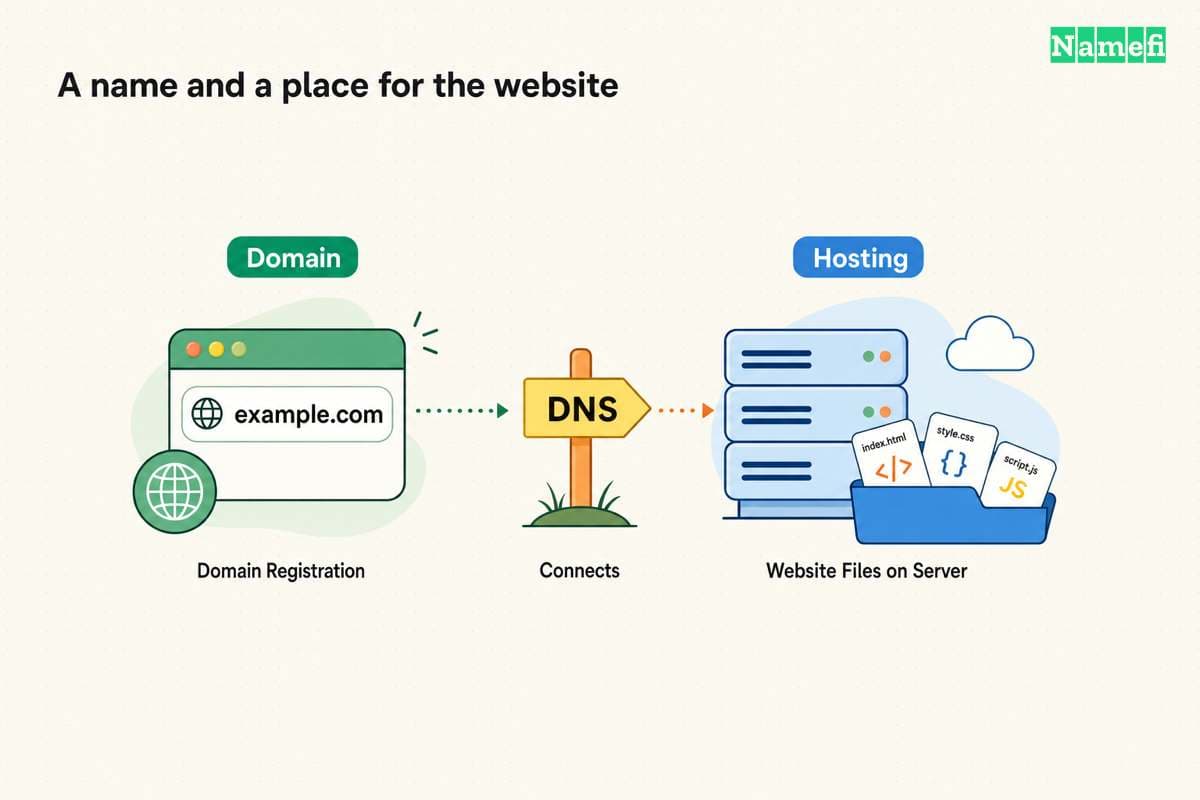
This guide compares the hosting models. For a provider shortlist, use the web hosting selection guide. For registration questions, start with domain versus hosting.
The plan matters more than the cloud label
Shared hosting places multiple customers on shared server resources. Cloud hosting describes an underlying infrastructure arrangement rather than a universal management package. AWS describes both concepts.
Ask a salesperson to replace the label with concrete answers:
| Question | Answer to request |
|---|---|
| What runs the site? | Supported software, versions, and deployment method |
| What resources apply? | CPU, memory, storage, and request limits |
| What scales? | The application, database, storage, or only the server size |
| Who maintains software? | A written division of customer and provider responsibilities |
| What happens after failure? | Recovery process and the customer's required actions |
| What creates extra charges? | Usage, add-ons, renewals, and support |
Do not treat a larger resource allowance as proof of better page performance. As a buying exercise, identify the slowest important action first. Record whether the problem occurs during checkout, publishing, login, or ordinary page loading.
A brochure that says “cloud” does not answer whether an administrator must patch the operating system. Ask that question before selecting a plan.
Shared hosting can fit a site with modest operational needs
Shared hosting deserves a place on the shortlist when a site uses supported software and needs a simple publishing workflow. AWS lists shared hosting for personal sites and small businesses. AWS also warns that activity from another site can affect performance. Read the shared-hosting explanation.
A practical evaluation should use the exact application. Ask whether the host supports the required database, extensions, scheduled tasks, and file sizes. Test those requirements during a trial or other permitted evaluation period.
For an illustrative local-business website, the important tasks might be updating opening hours and receiving appointment requests. Evaluate those tasks before purchasing infrastructure intended for a more complex application.
Ask how the plan handles excess usage. A useful answer states the limit, the notification process, and the upgrade path. “Unlimited” without a documented boundary gives you little information for planning.
Request a backup restoration demonstration if recovery matters to the business. Check whether the restore includes uploaded files and database content. Make a separate note of who can initiate the operation.
These are selection recommendations. They do not establish that every shared-hosting provider includes backups, email, or managed updates.
Cloud hosting is useful when a specific capability solves a problem
Cloud hosting becomes a stronger candidate when the application needs infrastructure that the current plan cannot supply. Identify the requirement before choosing a cloud product.
For example, AWS Lightsail offers instances, containers, databases, and storage. Lightsail also offers load balancing across instances. Those are separate capabilities to evaluate, rather than an automatic package for every website. AWS lists the resources and features.
Consider cloud hosting when your requirements include a custom runtime, separate application services, or an expansion plan with a responsible operator. Ask the provider to show how the proposed configuration meets that requirement.
For a hypothetical ticket-sales site, the question is whether checkout remains usable during the expected sales event. Request a test that exercises checkout and the database. A demonstration that serves only a cached home page does not answer the checkout question.
Before approving automatic scaling, define a spending boundary and a response procedure. Ask who receives an alert, who can change capacity, and who can stop unwanted usage. Treat those decisions as operating requirements.
Do not assume that moving the same application to another server removes an application defect. Keep measurements before and after the move so the team can distinguish a hosting change from a software change.
Management and recovery determine the work after purchase
Write a responsibility table before signing a contract. Include operating system updates, application updates, account security, backups, restoration, and monitoring.
A VPS may give a customer more control while also requiring technical expertise. AWS explicitly describes that tradeoff and points to managed hosting as an alternative. Read the VPS limitations.
Ask who responds when the site fails outside business hours. Confirm the support channel, scope, and escalation route. Support for the server does not necessarily establish support for your custom application.
Keep administrator access restricted to authorized staff. Request individual accounts where the service supports them. Assign responsibility for removing access when a contractor leaves.
For recovery, ask for an actual procedure. A useful procedure identifies the backup location, the restore operation, and the checks that establish success. Include a business action such as submitting a form or completing a test order.
Compare the operating cost before migrating
Build a comparison with the same billing period and currency. Use the live quote for each exact plan. Include renewal charges, backups, storage, data transfer, support, and required administrator time.
Keep one-time migration work separate from recurring hosting charges. A lower monthly quote can still require more work during migration or operation.
If the site contains only generated static files, consider whether a static hosting service fits. GitHub Pages publishes HTML, CSS, and JavaScript from a repository. GitHub documents that service. A requirement for custom server code needs a separate evaluation.
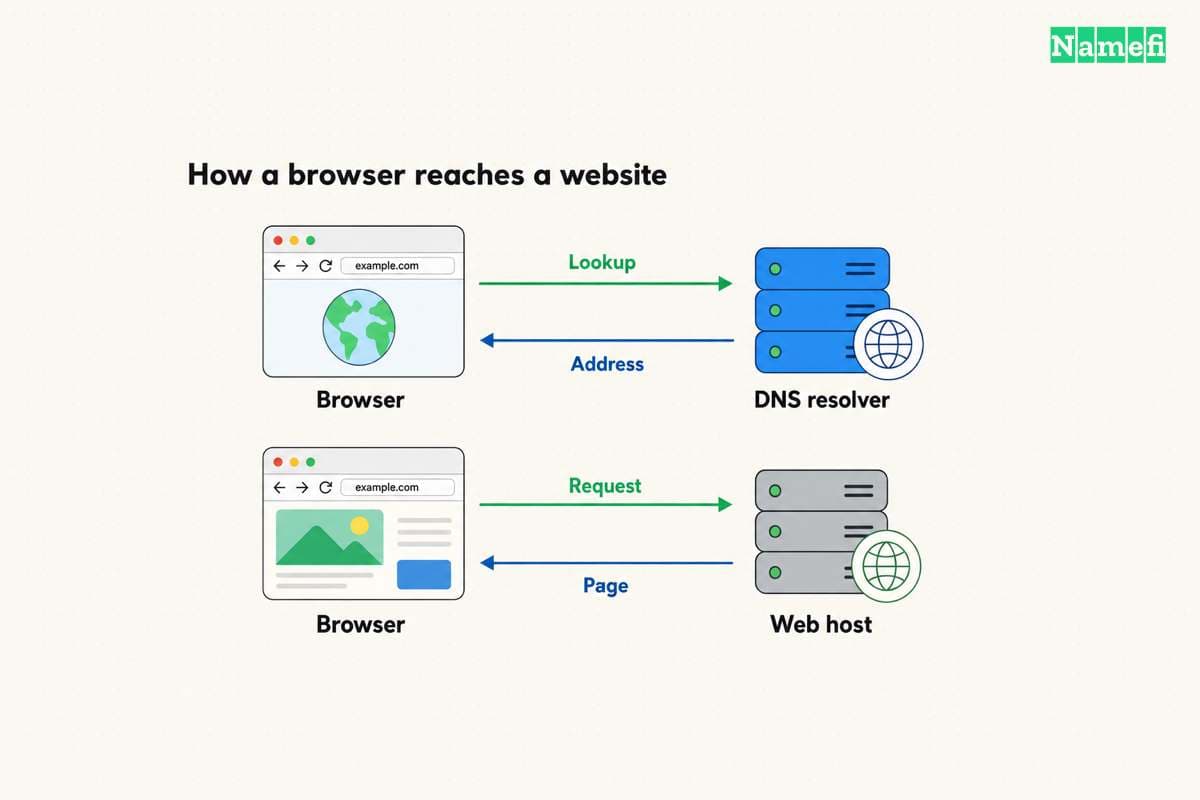
Before moving a working site, save the current configuration, test a copy, and prepare a rollback. Change website DNS only after the destination works. Preserve unrelated mail records and verification records.
The next action is a short requirements sheet: application, essential user actions, responsible operator, recovery procedure, and total budget. Choose the hosting plan that meets the sheet. Revisit the choice when measured requirements change.
Sources and further reading
AWS explains shared and cloud hosting
aws-hosting official source — fetched 2026-10-30 UTC.
AWS describes Lightsail resources
lightsail official source — fetched 2026-10-30 UTC.
GitHub describes its static hosting service
pages official source — fetched 2026-10-30 UTC.
About the author(s)
Fenwei Bian is a software developer in her thirties who spends her working hours in pull requests and her weekends with her hands in soil or sawdust. Years of open source on GitHub taught her that names are interfaces: a good one is clear, honest about what it does, and kind to whoever has to use it next.
She gardens because it rewards patience and punishes wishful thinking, and she does woodwork because a joint either fits or it doesn't. Both habits show up in how she writes about naming — measure twice, check the source, and don't sand over a rough spot and hope no one notices.
For Namefi she writes about how domain markets actually move, the practical trade-offs of tokenizing and flipping names, and picking a domain you'll still be glad you own in twenty years.